Filters and variants
The filters and variants are mechanisms used to modify the circuit components. Both concepts are closely related. In fact variants can use filters.
The current implementation of the filters allow to exclude components from some of the processing stages. The most common use is to exclude them from some output. You can also change components fields/properties and also the 3D model.
Variants are currently used to create assembly variants. This concept is used to manufacture one PCB used for various products. You can learn more about KiBot variants on the following example repo. The example is currently using KiCad 6, if you want to see the example files for KiCad 5 go here.
As mentioned above the current use of filters is to mark some components. Mainly to exclude them, but also to mark them as special. This is the case of do not change components in the BoM.
Filters and variants are defined in separated sections. A filter section looks like this:
filters:
 - name: 'a_short_name'
   type: 'generic'
   comment: 'A description'
   # Filter options
Supported filters
Examples for filters
The tests/yaml_samples directory contains all the regression tests. Many of them test the filters functionality.
int_bom_exclude_any.kibot.yaml: Shows how to use regular expressions to match fields and exclude components. Is the more powerful filter mechanism.
int_bom_fil_1.kibot.yaml: Shows various mechanisms. In particular how to change the list of keywords, usually used to match ‘DNF’, meaning you can exclude components with arbitrary text.
int_bom_fil_2.kibot.yaml: Shows how to use KiCad 5 module attributes (from the PCB) to filter SMD, THT and Virtual components. Note KiCad 6 is redefining the attributes.
int_bom_include_only.kibot.yaml: Shows how to use regular expressions to match only some components, instead of including a few.
int_bom_var_t2is_csv.kibot.yaml: Shows how to use filters and variants simultaneously, not a good idea, but possible.
print_pdf_no_inductors_1.kibot.yaml: Shows how to change the
dnf_filterfor a KiBoM variant.print_pdf_no_inductors_2.kibot.yaml: Shows how to do what
print_pdf_no_inductors_1.kibot.yamldoes but without the need of a variant.var_rename_footprint.kibot.yaml and var_rename_kicost_footprint.kibot.yaml: Shows how to replace a footprint using the variants mechanism. They can be applied to var_rename_footprint.kicad_pcb or var_rename_kicost_footprint.kicad_pcb respectively.
Built-in filters
_datasheet_link converts Datasheet fields containing URLs into HTML links
_expand_text_vars is a default
expand_text_varsfilter_kibom_dnc_Config it uses the internal
dnc_listto exclude components withValue matching any of the keys
Any of the keys in the
Configfield (comma or space separated)
_kibom_dnf_Config it uses the internal
dnf_listto exclude components withValue matching any of the keys
Any of the keys in the
Configfield (comma or space separated)
_kicost_dnp used emulate the way KiCost handles the
dnpfield.If the field is 0 the component is included, otherwise excluded.
_kicost_rename is a
field_renamefilter that applies KiCost renamings.Includes all
manf#andmanfvariations supported by KiCostIncludes all distributor part number variations supported by KiCost
‘version’ → ‘variant’
‘nopop’ → ‘dnp’
‘description’ → ‘desc’
‘pdf’ → ‘datasheet’
_mechanical is used to exclude:
References that start with #
Virtual components
References that match: ’^TP[0-9]*’ or ‘^FID’
Part names that match: ‘regex’: ‘mount.hole’ or ’solder.bridge’ or ‘solder.jump’ or ’test.point’
Footprints that match: ‘test.point’ or ’mount.hole’ or ‘fiducial’
_none does nothing, useful when you want to remove a filter with default value, but you want to keep the filters processing. Can be used in a filter chain. Note that an empty name will also create a _none filter
_null does nothing, useful when you want to remove a filter with default value, but you don’t want to keep the filters processing. Can’t be used in a filter chain. Note that inside a variant the filters processing will be triggered anyways, by the variant itself, but _null is faster than _none
_only_smd is used to get only SMD parts
_only_tht is used to get only THT parts
_only_virtual is used to get only virtual parts
_rot_footprint is a default
rot_footprintfilter_rot_footprint_jlcpcb is a
rot_footprintfilter with option specific for JLCPCB_value_split splits the Value field but the field remains and the extra data is not visible
_value_split_replace splits the Value field and replaces it
_var_rename is a default
var_renamefilter_var_rename_kicost is a default
var_rename_kicostfilter
Note that the kibom… filters uses a field named Config, but
you can customise them invoking _kibom_dnf_FIELD. This will
create an equivalent filter, but using the indicated FIELD.
Supported variants
Changing the 3D model, simple mechanism
This mechanism allows small changes to the 3D model. Is simple to use, but the information is located in the schematic.
If a component defines the field _3D_model then its value will
replace the 3D model. You can use var_rename or
var_rename_kicost filter to define this field only for certain
variants. In this way you can change the 3D model according to the
component variant.
When the component has more than one 3D model you must provide a comma separated list of models to replace the current models.
Changing the 3D model, complex mechanism
When the a component has a long list of 3D models and you want to keep all the information in the PCB you can use this mechanism.
The information is stored in the Text items of the footprint. If you
want to change the 3D models for certain variant you must add an item
containing:
%VARIANT_NAME:SLOT1,SLOT2,SLOTN%
Where VARIANT_NAME is the name of the variant that will change the
list of 3D models. The SLOT1,SLOT2,SLOTN is a comma separated list
of 3D model positions in the list of 3D models. All the slots listed
will be enabled, the rest will be disabled.
Here is an example. In this example we have a display whose aspect and connectio can radically change according to the variant. We have two variants:
left, uses a ERM1602DNS-2.1 with a connector on the left and two other pins on the righttop, uses a WH1602B-TMI-JT# with a single connector on the top
We have the following list of 3D models:
${KISYS3DMOD}/Connector_PinHeader_2.54mm.3dshapes/PinHeader_2x07_P2.54mm_Vertical.wrl
${KISYS3DMOD}/Connector_PinHeader_2.54mm.3dshapes/PinHeader_1x16_P2.54mm_Vertical.wrl
${KISYS3DMOD}/Connector_PinHeader_2.54mm.3dshapes/PinHeader_1x01_P2.54mm_Vertical.wrl
${KISYS3DMOD}/Connector_PinHeader_2.54mm.3dshapes/PinHeader_1x01_P2.54mm_Vertical.wrl
${KIPRJMOD}/steps/WH1602B-TMI-JT#.step
${KIPRJMOD}/steps/ERM1602DNS-2.1.step
The ERM1602DNS-2.1 uses slots 1, 3, 4 and 6. So the effective list will be:
${KISYS3DMOD}/Connector_PinHeader_2.54mm.3dshapes/PinHeader_2x07_P2.54mm_Vertical.wrl
${KISYS3DMOD}/Connector_PinHeader_2.54mm.3dshapes/PinHeader_1x01_P2.54mm_Vertical.wrl
${KISYS3DMOD}/Connector_PinHeader_2.54mm.3dshapes/PinHeader_1x01_P2.54mm_Vertical.wrl
${KIPRJMOD}/steps/ERM1602DNS-2.1.step
The WH1602B-TMI-JT# uses slots 2 and 5. So the effective list will be:
${KISYS3DMOD}/Connector_PinHeader_2.54mm.3dshapes/PinHeader_1x16_P2.54mm_Vertical.wrl
${KIPRJMOD}/steps/WH1602B-TMI-JT#.step
To achieve it we define the following texts in the footprint:
%left:1,3,4,6% and %top:2,5%. Here are both variants:
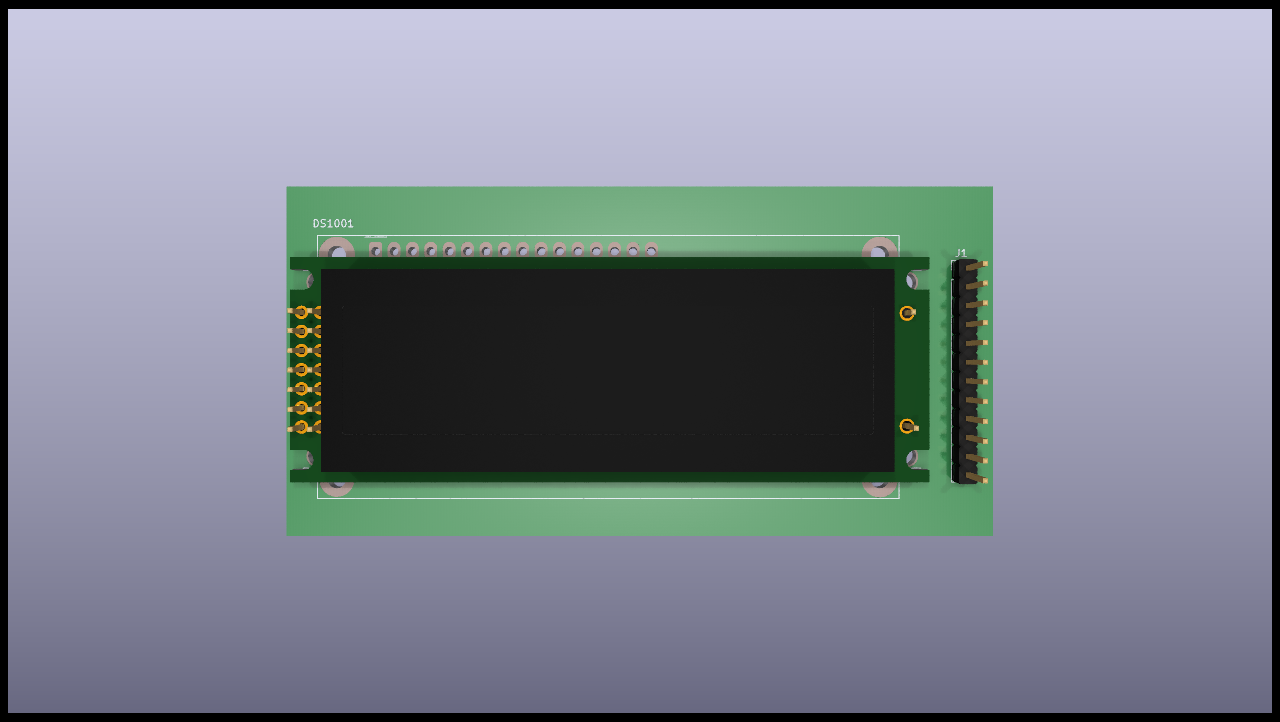
Left variant
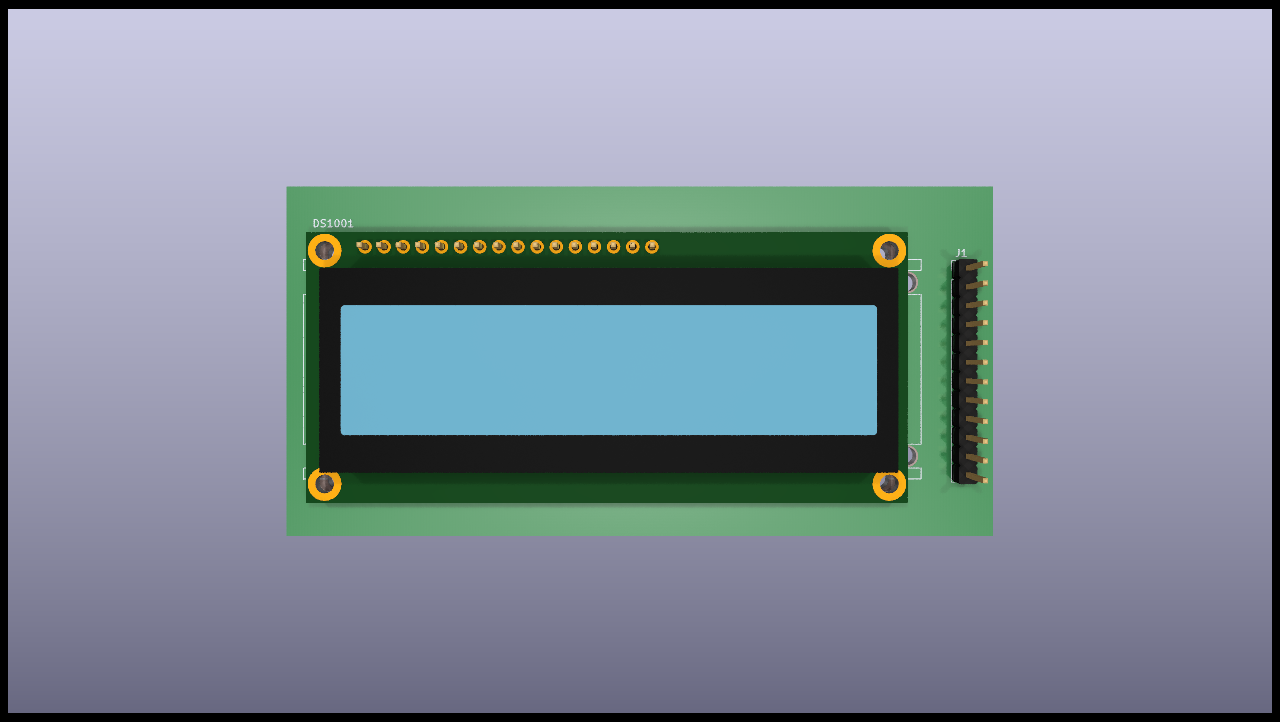
Top variant
If you preffer to use the variant specific matching mechanism you can use the following syntax:
$TEXT_TO_MATCH:SLOT1,SLOT2,SLOTN$
In this case the variant will be applied to the TEXT_TO_MATCH, if it
matches (equivalent to a component fitted) the SLOT will be used.
Some important notes:
If you want to control what models are used when no variant is used you’ll need to create a
defaultvariant. This is what the above example does. In this case thedefaultvariant shows all the connectors, but no display. Note that changing the 3D model needs the variants infrastructure.If you are using variants and a lot of them select the same slots you can add a special text:
%_default_:SLOTS%. This will be used if none%VARIANT_NAME:SLOT%matched.If you want to disable a model and avoid any kind of warning add
_Disabled_by_KiBotto the 3D model path. This could be needed if you want to remove some model and you don’t want to adjust the slot numbers.This mechanism can be used with any of the available variants. For this reason we use the
VARIANT_NAMEand we avoid relying on any variant specific mechanism. But you can use the alternative syntax if you preffer the variant specific matching system.
DNF and DNC internal keys
The current list of DNF keys is:
dnf
dnl
dnp
do not fit
do not place
do not load
nofit
nostuff
noplace
noload
not fitted
not loaded
not placed
no stuff
The current list of DNC keys is:
dnc
do not change
no change
fixed
You can define your own lists as the int_bom_fil_1.kibot.yaml shows.