Introduction
KiBot is a program which helps you to generate the fabrication and documentation files for your KiCad projects easily, repeatable, and most of all, scriptably. This means you can use a Makefile to export your KiCad PCBs just as needed, or do it in a CI/CD environment.
If this is the first time you read about KiBot, and you prefer to be introduced listening to a podcast, you can try the following (english audio, english and spanish subtitles available):
Here is another podcast, more centered on the CI/CD side:
So, for example, it’s common that you might want for each board rev to create/do:
Check ERC/DRC one last time (using KiCad Automation Scripts)
Generate and/or update QR codes embedded in the PCB/SCH, the drawing of the stack-up, etc.
Create assembly variants of the product
Gerbers, drills and drill maps for a fab in their favourite format
Fab docs for the assembler, including the BoM (Bill of Materials), costs spreadsheet and board view
Pick and place files
PCB 3D model in STEP, VRML, STL, glTF, BRep, XAO and PCB3D formats
PCB 3D render in PNG format (including high quality render using Blender)
Compare PCB/SCHs
Panelization
Stencil creation
You want to do this in a one-touch way, and make sure everything you need to do so is securely saved in version control, not on the back of an old datasheet.
KiBot lets you do this. The following picture depicts the data flow:
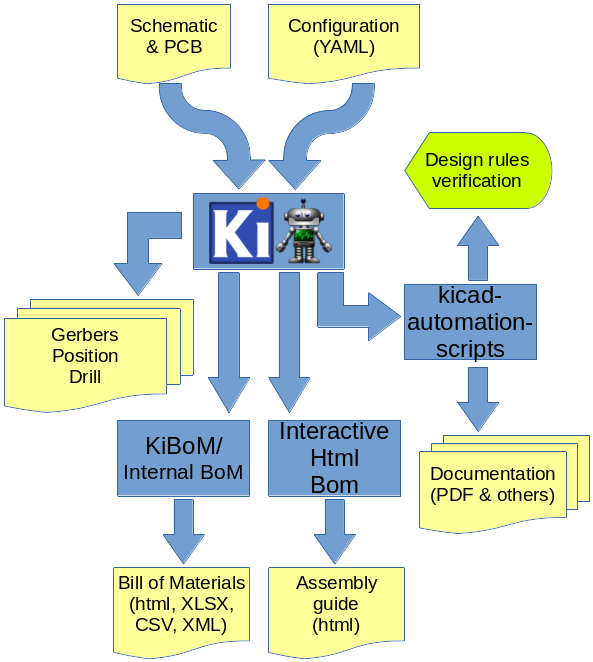
KiBot workflow example
If you want to see this concept applied to a real world project visit the Spora CI/CD example.